
Meta Quest PTC Update Overhauls Window Management and Restores Classic Home Environments
Horizon OS 2.9 public test build introduces spatial window grouping, a new window manager, and brings back Desert Terrace and Space Station environments.

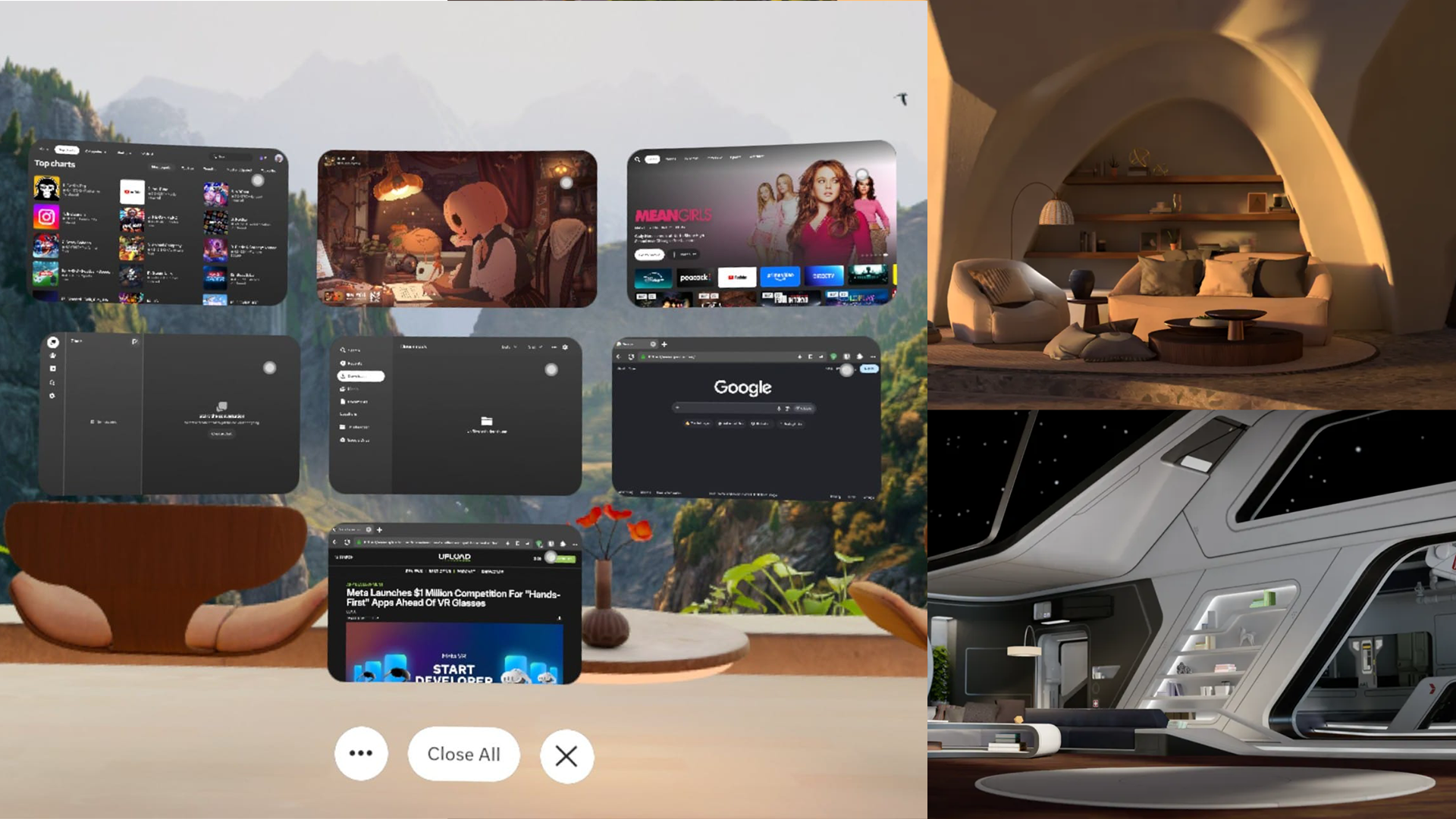
Meta has released a new Public Test Channel build for Horizon OS 2.9 (version 209) that overhauls 2D window management and reintroduces legacy home environments. The PTC is Meta Quest's beta release channel; features in the test build may not appear in the eventual stable version, and rollout timing varies by headset.
The centerpiece of the update is a window management system codenamed Display Evo. It removes the dock entirely and lets 2D windows open spatially around the user. Windows can be grouped by moving their edges together or arranged into a "Stack" that can be flipped through like a deck of cards. A new Window Manager component, accessible via Quick Settings, shows all open 2D windows and allows users to bring them forward or close them individually or all at once. Meta describes the Window Manager as broadly similar to Android XR's app management interface.
Control Bars have been redesigned with a dedicated grab handle and separate function buttons, a change Meta says is designed around the gaze input system planned for its upcoming VR Glasses. The standalone "Anchor" option has been removed from the Control Bar in favor of Magnetism, a default behavior introduced in Horizon OS 2.1 that automatically attaches windows to vertical surfaces when pushed against them. Meta says Magnetism now works more reliably in the 2.9 PTC.
Responding to user feedback after the v81 PTC replaced all legacy Virtual Environments with a single space called Loft, Meta has added a Classic Environments submenu in the Home Editor. Accessed via the left Touch controller menu button or a palm-facing pinch, the submenu currently offers Desert Terrace (the Quest 2 default) and Space Station (released for the original Quest in April 2020). Both environments have been ported to the Horizon Engine with optimized performance and free locomotion. Dataminer and programmer Nori found additional Virtual Environments with active development channels in the submenu, suggesting more may be released on a rolling basis.
Horizon OS 2.9 PTC also adds a system-level QR code scanner for Quest 3 and Quest 3S. The scanner can be opened from the Camera app, added to Quick Controls as a tile, accessed through Navigator's Global Search, or invoked by asking Meta AI, "Hey Meta, open QR code scanner." In testing, the scanner works well for speed but is currently an immersive app, meaning it cannot be used alongside 2D windows in Passthrough or to scan QR codes that appear within 2D windows or inside immersive apps such as VRChat.
Surface Keyboard and Touchpad, introduced as an experimental feature in v85 PTC (January 2026), receives UI simplifications that more closely match the Meta VR Glasses reveal video. Meta states the feature now works in fully virtual environments as well as passthrough, though this was not functional in the tester's experience, suggesting a separate rollout. Finally, Boundary Setup Recovery changes the scene capture system so that if Boundary setup or space scanning is interrupted, the headset reverts to the previous Boundary or defaults to a Stationary Boundary.
Sources
- UploadVREstablished publication · recorded Oct 6, 2026Quest PTC Overhauls Window Management & Brings Back Classic Home Environments